Best Free Graphic Design Software
Graphic design software creates multiple forms of visual content. This type of software can be used to make infographics, logos, digital paintings, and photo-realistic images. Free graphic design software is either open source or part of a “forever free” subscription plan. When evaluating free graphic design software, you should consider design tools and ease of use. The six graphic design software options discussed in this piece are:
Graphic Design Software for Each Type of Content
| Graphic Design Software | Open Source? | Platforms | Suitable for Beginners? | Biggest Pro | Biggest Con |
| Canva | No | Browser, iOS, Android | Yes | Design Templates | Limited Photo Editing |
| Mediamodifier | No | Browser | Yes | Simple User Interface | Creates basic SVG images |
| Inkscape | Yes | Windows, Linux, MacOS | Yes | Advanced Toolkit | The program occasionally locks up with a high-quality image. |
| Krita | Yes | Windows, Linux, MacOS | Yes | Customizable Brushes | Requires a Lot of Computer Memory |
| Daz Studio | No | Windows, MacOS | No | Tutorials and Training Videos | Limited Selection of Free 3D Content |
| Blender | Yes | Linux, Windows, Macintosh computers | No | 3D Modeling Tools | Learning Curve |
Canva – Customizable Design Templates
Canva is the ideal choice for those who do not have any experience with graphic design. This platform uses pre-built templates to create everything from infographics to logos. The free version gives users access to over 250,000 templates and 100+ design types. These templates are known for their professional, eye-catching design that makes extremely high-quality content easy to produce.
The platform includes a drag-and-drop interface that adds new images to the template. You can resize your pictures and apply filters to enhance your image quality. Canva is well known for its photo editing capabilities.
Canva is easier for beginners to use and has less of a learning curve. If you are new to photo editing or have a limited design budget, then Canva is your best option. It has all of the essential photo editing tools in a completely free subscription plan.
This tool is also a great choice for projects that require collaboration. The platform enables real-time collaboration with the online whiteboard. You can also use Canva’s mind maps to share ideas with the rest of your team.
SVG-Editor by Mediamodifier
SVG-Editor by Mediamodifier is a free graphic design tool. The vector SVG files can be resized, color adjusted, modified borders, or merge multiple icons with ease. The free, feature-rich design maker includes powerful built-in SVG editing tools, making it the fastest way to edit graphics online. It creates stunning visuals, edits SVGs, or works on video projects—all from one editor. Just open it and choose the canvas size that suits your design.
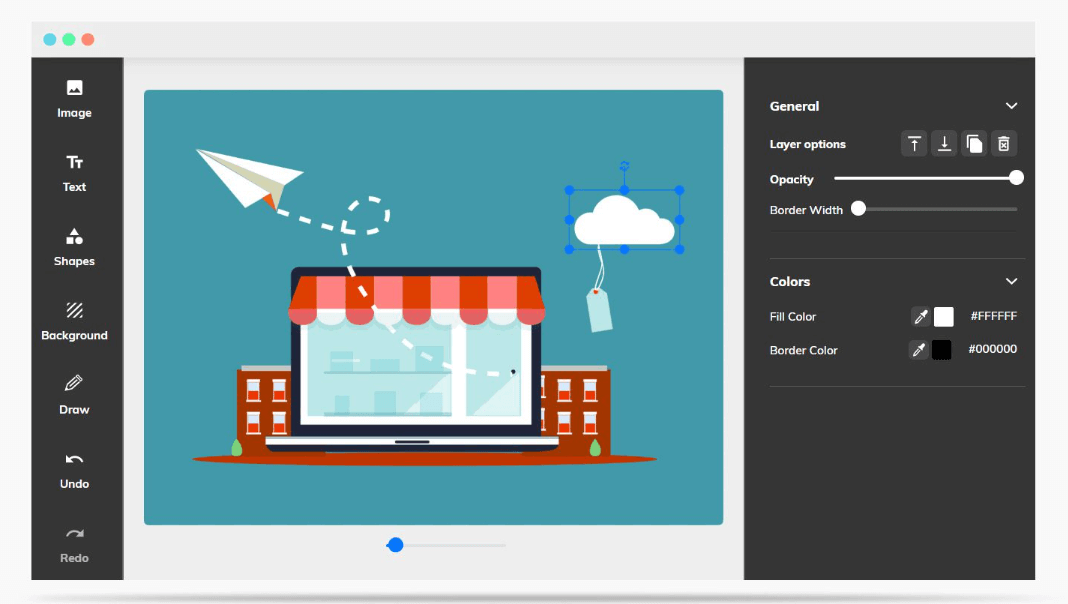
An SVG file or icon directly onto the editor canvas can be dragged and dropped. You can resize the canvas at any time to fit your needs. Select your SVG image and, if necessary, ungroup it to access and edit individual elements within the vector design.
You can fine-tune your designs in seconds by changing fill and border colors, resizing borders, and moving objects to the front or back. Mediamodifier makes editing SVGs and icons effortless, and perfect for quick adjustments to colors and layouts. When you’re done, download your design as an SVG, PDF, JPG, or PNG.
Inkscape – Advanced Vector Graphics
Inkscape is a free, open-source vector graphics editor available for GNU/Linux, Windows, and macOS. It provides a comprehensive set of tools for both artistic and technical illustration, including cartoons, clip art, logos, typography, diagrams, and flowcharts. By using vector graphics, Inkscape ensures sharp printouts and renderings at any resolution, unlike raster graphics, which are limited by pixel count. Its primary format is SVG, a standardized file type supported by many applications and web browsers.
Inkscape also supports importing and exporting multiple formats such as AI, EPS, PDF, PS, and PNG. With a simple interface, multilingual support, and extensibility through add-ons, it is a versatile solution for designers and illustrators.
The Inkscape project is supported by a growing international community of users. A wide range of learning resources is available to help you get started with your creations. Community members provide help and support, and there are many opportunities to contribute if you’d like to be part of improving Inkscape.
Krita – Elaborate Digital Paintings
Krita is a free and open-source digital art platform that empowers artists to create from scratch. Available across multiple operating systems, it is built for long, focused sessions and supports disciplines such as illustration, concept art, matte painting, textures, comics, and animation. Shaped by feedback from its community, Krita reflects the real needs of artists and their workflows, while remaining committed to open standards and interoperability with other applications.
Although Krita offers some overlapping features with raster editors, its mission is clear: to deliver a powerful tool for digital painting. It is not intended to replace Photoshop, which is better suited for photo editing tasks like stitching images together. Krita’s strength lies in its specialized tools for painting, illustration, and texturing—choices that drive its unique design.
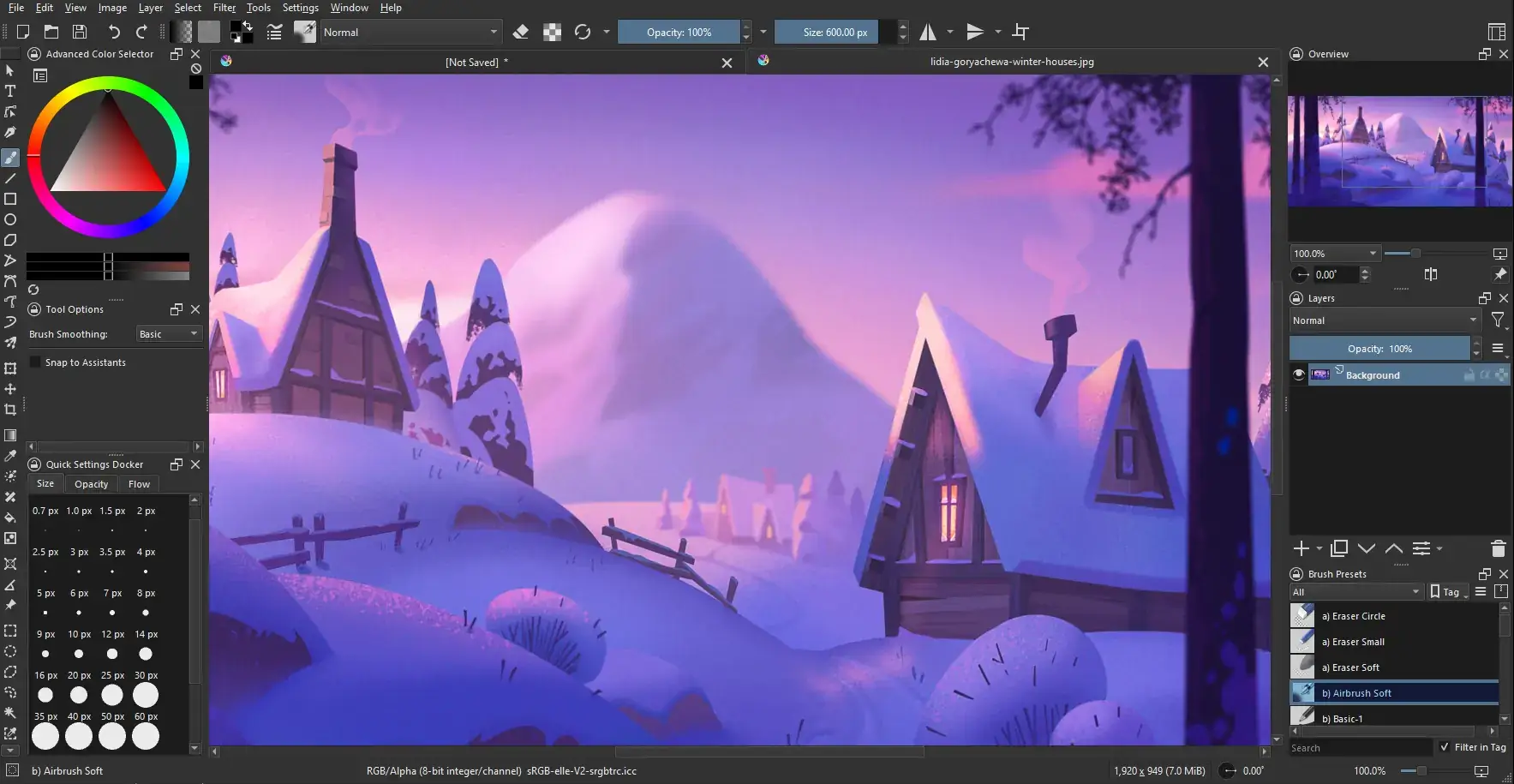
Krita’s interface is built to be simple and unobtrusive, letting you focus entirely on your art. You can move and customize dockers and panels to fit the way you work, then save your layout as a personal workspace. For even greater efficiency, you can create your own shortcuts for the tools you use most often.
Daz Studio – Realistic Characters and Animations
Daz Studio is a free software that allows users to create 3D artwork. This software is ideal for those who have previous experience with 3D rendering and animation. There are tutorials and forums on the Daz 3D website to help beginners overcome the learning curve.
Daz Studio is useful for creating detailed characters. Daz Studio allows you to customize the model’s hair color, eye color, and clothing. You can also add props or a background to the scene. With Daz Studio’s rendering capabilities, you can save your scene as a photo-realistic image or use it to create animations.
This software also includes a 3D content library where users can find things like clothing and backgrounds to add to their renderings. Some of the options in the 3D content library are free. However, a vast majority of the 3D content is only accessible with a purchase. Potential users should pay close attention to the listed price of 3D content.
Blender- 3D Modeling Tools
Blender is a free, open-source 3D creation suite that covers the entire production pipeline: modeling, rigging, animation, simulation, rendering, compositing, motion tracking, video editing, and game asset development. Its Python API enables advanced users to customize workflows and build specialized tools, many of which are later integrated into official releases. With its unified pipeline and active development community, Blender is an ideal solution for individuals and small studios seeking a flexible and responsive platform.
Blender includes digital sculpting tools to help users make their own 3D models. Blender’s sculpting tools are advanced but not extremely user-friendly. Potential users should consult video walkthroughs before attempting to use Blender’s sculpting tools.
Blender is also useful for creating animations. The animation toolset includes a pose editor and sound synchronization. You can also use motion paths to visualize movements through a series of frames. These tools help users create professional-looking shorts or films.
This software is a great alternative to Daz Studio. If you have the technical skills to create your own 3D models, then Blender is the better option. This software is very useful for professionals who have the patience to overcome the learning curve.
More Graphic Design Software
If you are interested in learning more about graphic design software, be sure to check out the Graphics Software category in TrustRadius. You can compare reviews and product features to ensure that you select the proper software for your design projects.
For those who are beginners in the graphic design space, check out the video below for some great fundamentals.