Red Hat License Subscription Pricing 2026
Red Hat Enterprise Linux, with its redefined operating system and hybrid cloud solution, empowers organizations to run their most critical and complex projects seamlessly across datacenters, clouds, and the edge. Backed by an open ecosystem of partners and communities, it safeguards existing investments while enabling the freedom to evolve, transform, or maintain stability. It also delivers open source innovations, AI, and virtualization to the edge, app development, and automation.
From managing cloud computing to software development, Red Hat can be a comprehensive tool for the big three cloud providers. Whether you’re a major enterprise or an indie developer, Red Hat has a vast amount of tools and resources for innovators. Having built incredible infrastructure on the open-source operating system (OS), they are a great choice for Linux dev teams.
What is Red Hat?
Red Hat has been a powerful and relevant open-source software developer for more than 20 years. The majority of their products have open-source code, so they’re easily customizable. They also produce free open-source downloads of their products and sponsor open-source projects. The company has solutions for IT automation, modern cloud architecture, and developer teams building apps with cloud providers. Their robust services include operating systems and virtual machines (VMs).
Some of their products include Linux®, AI, virtualization, automation technologies, and Red Hat OpenShift for multi-cloud deployment. The Red Hat OpenShift Virtualization, built into Red Hat OpenShift, offers a unified platform to run and deploy both new and existing virtual machine (VM) workloads. It simplifies migration, modernization, and management of traditional VMs on a trusted hybrid cloud application environment.
Teams can see more about how Red Hat Virtualization works here. You can also find information like new features and product pricing from their extensive PDF on the product here. For a look at all their products, you can visit their page here.
The Red Hat platform has a wide array of open-source software and resources for DevOps teams. One of their most important missions is developing enterprise-level, open-source software so more teams can innovate.
Many of their paid subscriptions have community versions, and they actively contribute to open-source projects like Fedora. Appropriately named after Red Hat’s iconic logo, Fedora is one of their Linux Distributions. It’s an ideal free choice for an operating system with flexible functionality to develop customizable applications. You can find the software for download here.
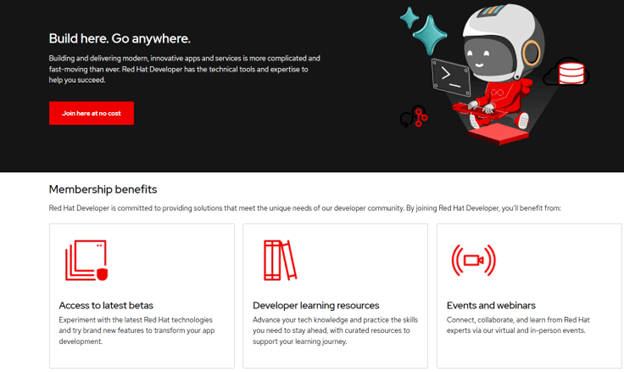
There are even more free resources on the Red Hat Developer website here. There you will find the open-source versions of many products ready for download. You’ll also find downloadable tutorials, e-books, and cheat sheets, all completely free. For access to even more resources, you can register for the Red Hat Developer subscription, which is also completely free.
Learn more about Red Hat’s latest innovations from the video below.
How Does the Red Hat Subscription Model Work?
The Red Hat pricing model is definitely on the complex side. In the pricing table, we do not look at all Red Hat subscriptions. We only look at the featured products in the Red Hat Store. They have several more subscriptions for their Enterprise Linux, Middleware, and Training services. You can find their full product list here.
Teams can access some general background information about the subscriptions on the FAQs page. They answer common questions about Red Hat Support offerings as well as physical hardware and software certifications. There is also the FAQs page for the Red Hat Store, which answers more technical questions about their products, like the difference between physical and virtual hosting.
They also have a page about subscription benefits. This page discusses features like technical support, security resources, supported lifecycles, partner ecosystems, proactive analytics, and many other details beyond the common questions page.
We go into the No-Cost Developer Program and the open-source version of Red Hat Enterprise Linux (RHEL) first, and then talk about the featured paid subscriptions Red Hat offers.
What is The Red Hat Subscription Free Version?
In general, you can find free open-source software from Red Hat on its separate site, Red Hat Developer. There is no guarantee that all products have a free version. For free and open-source alternatives to their popular RHEL subscriptions, there may be some confusion.
There is the open-source download with the Developer subscription, and there’s the completely separate open-source project Linux CentOS. CentOS was a widely popular open-source Linux distribution that teams could access.
The current free version of RHEL is part of the Developer subscription and requires you to be an individual developer, not a commercial team. The RHEL no-cost edition can be downloaded here. You will need to join the Red Hat Developer Program, which has great benefits like tutorials, training, and live events. The FAQs page for no-cost developer versions of RHEL can be found here.
How Much Do Red Hat Subscriptions Cost?
There are 4 different subscription services. Again, these are not the only product subscriptions for Red Hat, but are just the featured product subscriptions in the Red Hat Store. When it comes to purchasing a subscription, you buy them in one-year or three-year packages.
Main features that all Red Hat Subscriptions come with include upgrades, customer portals, security, and access to the knowledge base. Some, but not all, plans allow you to add on other services or utilize powerful capabilities like analytics.
The main difference between plans that buyers can see is technical support and add-ons. We recommend that you contact sales for the most in-depth explanation of which plan is best for you and your team.
| Red Hat License Subscriptions | Individual Plan Cost (per year) |
| Red Hat Enterprise Linux Server |
Self-Support – $383.90 Standard- $878.90 Premium- $1,428.90 |
| Red Hat Enterprise Linux for Virtual Data Centers |
Standard- $2,748.90 Premium- $4,398.90 |
| Red Hat JBoss Enterprise Application Platform |
Standard- $8,800 Premium-$13,200 |
| Red Hat Enterprise Linux Workstation |
Self-Support-$196.90 Standard- $328.90 |
The Red Hat Enterprise Linux Server subscriptions offer 3 diverse options. The Self-Support plan is more of a bare minimum option. It has no support, hosting, or production environment, so you can distribute to end-users.
It can only be deployed on physical systems (on-premises). In terms of add-on options, you can track the Red Hat Satellite, the smart management package, to optimize the organization of your environment. It’s good for privacy, but the Standard and Premium subscriptions offer on-premises hosting as well, so compared to other plans, it may not be worth it.
For the Standard and Premium subscriptions, you do get support and more add-on choices. Standard has phone and web support, as well as the ability to add extended support, the smart management bundle, high availability, and resilient storage features. The Premium plan has 24/7 support, and the same options for additional features (except support, because you already have it).
It mainly depends on whether you think you need less or more support. Standard and Premium are still definitely better options because they do offer you a production environment.
Red Hat Enterprise Linux for Virtual Datacenters is recommended for use cases that need a more robust version of the RHEL Server subscription. If you have very intricate virtual servers, then you would need this version. It manages the infrastructure better using the same functionality as Red Hat Virtualization. The Standard and Premium plans both have support and the same add-on options as RHEL Server.
When it comes to the Red Hat JBoss Enterprise Application Platform, it’s the black sheep of this group. JBoss is an app server that can be used as a middleware platform. It’s a development environment for automation and integration, specifically with the programming language Java (the J in JBoss). The Standard plan has web and phone support, while the Premium has 24/7 support. There are no add-ons available.
You may have heard of JBoss before. Red Hat has a separate project with Apache, called the JBoss Web Server. It’s a secure deployment option for web applications. The JBoss Enterprise Application is a version with more integrations and functionality than the JBoss Web Server. The JBoss Web Server Community version was discontinued.
For the Red Hat Enterprise Linux Workstation, teams have access to an advanced Linux for graphic visualizations and animation. The Self-Support option has no support and cannot be used for production, while the standard can do both. Neither has the option for add-ons.
What is an Alternative to Red Hat?
Oracle is an absolute powerhouse tech company that offers open-source software to enterprises. They specifically have an open-source alternative to Red Hat Enterprise Linux subscriptions and CentOS Linux (again, it’s an open-source Linux distribution by Red Hat). This solution by Oracle is called Oracle Linux. Oracle Linux is a high-performance operating system that can be used for automation, visualization, and cloud computing development. It’s lately been marketed as an option that is both RHEL compatible and a good replacement for CentOS Linux.
When it comes to end-user reviews, both programs have a strong positive reviewer sentiment. They each have very high TrustRadius scores reviewed by the product users based on their user experience, with Oracle Linux being 8.6/10, and RHEL being 9.2/10.
We have an extensive comparison between these two software programs that you can find here. Both products are distributions of Linux, and while RHEL and Oracle both have a free version as well as paid subscriptions for enterprises are expensive. To know more about Oracle, check the basic support.
There are a few issues that end-users have with RHEL. They have mentioned that rescanning new disks or the extended disks, and license modeling can be made easier for users. Also, a few features can be integrated in a wizard-based format. Another user has also mentioned that increasing the disk space size of partitions and assigning and changing file and folder permissions can be difficult.
When it comes to choosing between them, both are great choices with great benefits. It really depends on the functionality you want and the budget you have. Each of them can get pretty expensive, but both offer free versions.
More Resources
The curious parties that want to learn more about Red Hat can find a plethora of information on the tech dark horse. The best place to start is the company’s about page here, and from there, you can go to their blog and read their Accelerating AI-powered management here. TechTarget is a super in-depth resource about software, and they have a great article on the history of Red Hat here.
If you’re interested in more related software, you can find a list of operating systems products here. For those who have used any of the platforms discussed here, please leave a review to help other buyers make informed decisions. To continue your research on different products, read verified reviews, and find the solutions that best fit your needs, keep exploring TrustRadius.