5 Leading Free or Open-Source LMS Solutions
Learning Management Systems (LMS) are crucial to continued education and professional development for professionals. They are also essential to delivering online courses and scalable teaching administration. However, not every organization has the funds to pay for a large, pricier LMS platform.
Free or open-source learning management software can serve the needs of smaller organizations without the upfront costs. We’ve compiled 5 of the leading open-source or free learning management systems that could best serve your specific use case:
This article highlights how each LMS may be used differently for academic or corporate applications. These insights can help you build a shortlist of learning management systems. These products can also help avoid breaking the bank with license fees.
Is There Really a “Free” LMS?
There’s no such thing as a “free” technology—the costs may just be hidden. This is often the case for free or open-source learning management systems.
These free plans are usually limited either in the range of features and/or the number of users. “Free” LMS usually refers to a system that organizations don’t have to pay a vendor to use. However, free LMS’s are frequently free versions of larger LMS offerings (although there are notable exceptions). Consider what the upgrade path for each free product would look like to evaluate how scalable the product will be as the organization grows.
An open-source LMS can be downloaded and hosted by anyone. This type of software tends to lack highly-desired features. These can include video conferencing and robust multimedia support. It is also less likely to integrate with other school technology, such as student information systems.
The lack of a vendor means limited customer support and implementation assistance. These resources are usually included in a paid LMS. This shifts the burden of installing, managing, and maintaining the system onto your organization. Your IT department takes the brunt of this work. The exact resourcing required will vary by software. In general, the larger your organization and the more customization you need, the more resource-intensive the system will be for your institution or business.
The 5 Leading Free or Open-Source Learning Management Systems
Moodle
Great for Scaling, at the Cost of Usability
Moodle is one of the most popular open-source learning management systems available. It is also one of the more scalable open-source options, particularly for academic institutions. The software is also used less commonly in a business setting. Some find its features are less suited for corporate contexts, although some businesses do find success with Moodle.
Moodle is free to download and install. The platform’s scalability comes with higher resource and maintenance costs over time. Moodle can mitigate these costs by hosting the platform itself via MoodleCloud. There are also certified 3rd-party partners that can provide support and consultation services.
Moodle reviewers highlight its robust functionality and scalability for an open-source platform. Since Moodle is so popular, there is a wide range of support and community forums available. These communities lessen the learning curve of adopting the platform without vendor support.
The scalability can come at the cost of ease of use and the learning curve mentioned above. Users report that much of Moodle’s functionality can be buried in the interface. It can take some time to learn how to make the most of what Moodle offers.
In recent years, Moodle has made strides to make its user interface more friendly to less tech-savvy users. Some users still report issues getting comfortable with the tool. Developer support is often required for teachers to take advantage of more advanced customizations.
Moodle still offers a range of functionality that some users consider best-in-class. For organizations looking to adopt Moodle, make sure there is a robust plan for resourcing the platform properly within the organization. For those without these resources, they can budget for vendor or 3rd-party technical support.
Alison
Easy to Manage, Easier to Chat
Alison’s Free LMS, a comprehensive, all-in-one solution, offers skill development. Though the platform meets the needs of many organisations, it recognises that some may require more tailored functionality. For those seeking advanced customisation, LMS offers the ability to personalise the learning portal to meet any organisation’s specific requirements. Its enhanced features include an ad-free learning environment, co-branded certificates, and additional options to promote the learning experience.
Alison’s mission is to empower organisations as well as individuals by removing financial barriers and continuing professional development. It is committed to make learning accessible to organisations of every size and type, from SMEs and NGOs to vocational institutions and large corporations.
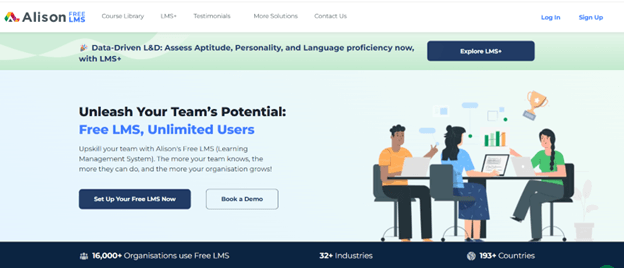
Alison’s Free LMS is trusted worldwide, supporting diverse industries, geographic regions, and business models. Behind the platform is a dedicated team of professionals who bring a wealth of expertise and a shared passion for creating impactful learning experiences. The content within our LMS is developed and curated by industry leaders and subject-matter experts, ensuring that every learning journey is both relevant and transformative.
Sakai
The open-source Middle Ground between Alison and Moodle
Sakai is a longstanding open-source LMS that takes the open-source aspects of the software seriously. Universities, educators, and developers are engaged in the continual development of Sakai. This dedicated community entirely manages the development of the product. There are no vendors involved. Commercial affiliates deliver paid support for organizations that need it.
Sakai is almost exclusively focused on serving higher education. Its focus on this particular use case allows it to tailor its development to the functionality that is most needed. This may contribute to recent positive feedback on the student experience on the platform. Student ease of use is a notable advantage among open-source learning management platforms.
Sakai may face long-term challenges. As a result, faculty often report that students who have dropped remain on their Sakai rosters. While new students are added automatically, faculty must manually manage roster removals.
The community helped deliver an impressive LMS in Sakai. Organizations should shortlist this software if they have users committed to the open-source project. With internal buy-in, organizations can definitely make the most of Sakai’s true open-source vision.
Google Classroom
For the Workspaces Power Users
Google Classroom is a unique offering on this list. It is not open-source, as the platform is owned by Google. However, Google Classroom is absolutely free for institutions with a .edu status. Google Classroom’s remote accessibility also makes it viable for nontraditional education, such as remote learning. The LMS is less viable for corporate use since it is not free for businesses.
Google Classroom also comes with the rest of the Google Workspace (formerly G Suite). This includes tools like Docs, Sheets, and Slides. It also provides a paid upgrade path for more advanced analytics and features. These include video communication and anti-cheating tools. The paid version starts from $6 per user per month on the Cloud.
Google Classroom stands out for several reasons. Native integration with Google’s productivity suite makes student collaboration much easier and more intuitive. Organizations also do not have to host the application itself. Google both hosts the platform and provides 100+ terabytes of pooled cloud storage.
Some of Google Classroom’s more advanced features are paywalled. These include polling, attendance tracking, and breakout rooms. The user interface is also criticized for an aged look and a less intuitive feel than one would expect from a Google product. Some school-specific features, such as managing assignments, can also be glitchy for some users. Google Classroom is also less supportive of 3rd party tools and integrations than other products on this list.
“I use Google Classroom for posting assignments and announcements for my classes as a middle school Graphic Design teacher in Texas. Google Classroom allows students to have easy access to all assignments, resources, and an organized place to turn in their assignments. This also allows students the ability to access their class materials remotely.”
Read the full review here.
TalentLMS
The Free Corporate LMS Option
TalentLMS’s free offering is a standout example of offering limited free versions of a paid product. TalentLMS’s free version is ideal for delivering training programs in very small businesses.
The free version is limited to 5 users and can only support 10 courses. The product will be far less viable for organizations looking for low-cost scaling. Paid plans offer more scaling, but can cost starts from $119 /month for 1-40 users, depending on the number of users and features required. TalentLMS also offers “Active Plans,” which scale pricing based on the number of active users within a month, rather than the pure number of seats.
TalentLMS offers several advantages if an organization isn’t concerned with scalability limitations. Paid learning management systems tend to highly prioritize ease of use and manageability. This is crucial since so many LMS users are not IT specialists. The user interface is easy to use. HR managers are able to easily track employees’ and learners’ progress through courses and content. It also offers a full range of corporate learning management features. These features are designed for business users, differentiating TalentLMS from many open-source LMSs.
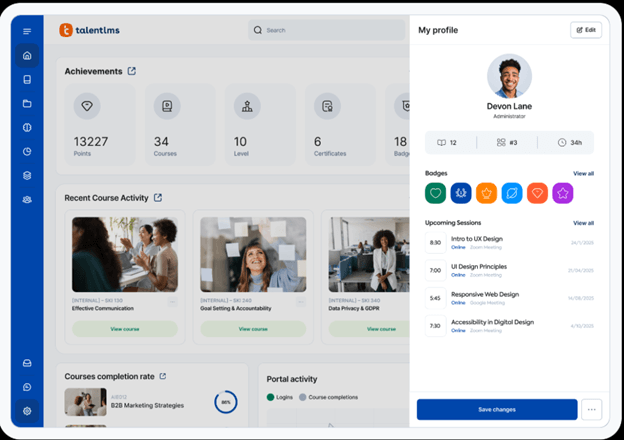
There are some considerations to keep in mind beyond the relatively pricey upgrade path. Customization options may be more limited than those of an open-source LMS. Reviewers also experienced struggles reporting on LMS content and student progression.
“We use TalentLMS to provide HR and employment law training to our clients. We provide training on things from general training to state-mandated sexual harassment, as well as advanced issues such as the interplay of different laws. It is great as we don’t have to schedule live trainings or coordinate schedules on either side to get all those who need to be in the training in the same room at the same time.”
Read the full review here.
The free version can still be viable for very small use cases. Department training on a handful of specific courses is an ideal application for the free version of TalentLMS. Compliance training is a common use case. It can also serve as a demo version of the platform before organizations choose to invest in the platform financially.
LMS FAQs
Is an Open-source LMS truly free?
- The software license may be free, but implementing it often requires additional investment. Costs can include hiring developers for customization, setting up servers, paying for hosting, and covering maintenance and support.
What are the main challenges of open-source LMS?
- The biggest hurdles with Open-source LMS usage are the reliance on technical expertise, extended implementation cycles, and the burden of maintaining updates and security patches—all of which can impact long-term sustainability.
How do I choose the right Open-source LMS?
- To select the right open-source LMS, assess your organization’s technical expertise, required functionality, integration needs, and the strength of available community or commercial support.
What is the difference between free or Open-Source LMS Solutions and Corporate LMS?
- Open-source LMS platforms provide free software, extensive customization, and full control over data. However, they demand internal IT expertise and self-hosting. In contrast, corporate LMS solutions are proprietary, subscription-based SaaS offerings that deliver user-friendly interfaces, dedicated support, built-in compliance tools, and rapid deployment—though customization options are more limited. Open-source LMS platforms are free to download but carry costs for hosting, maintenance, and development. Corporate LMS solutions, by contrast, use subscription or per-user pricing models, providing greater cost predictability.
Choosing between Free and Paid LMS
Free and open-source learning management systems can serve some organizations and institutions well. However, many businesses and schools will feel the lack of vendor support and advanced features. They may also be less prepared to manage the overhead costs of an open-source platform than they thought.
There are many learning management systems available to schools and businesses that are willing to pay. Academic institutions can explore what their peers are saying about other learning management systems for schools. Businesses can also see what corporate-sector LMSs are available for their teams.
Some teachers are less in need of a full LMS. Instead, they may just need an online teaching portal for remote instruction. In this case, check out reviews of virtual classrooms. You can also check the Best Learning Management Systems (LMS) 2026 in TrustRadius’s reviewed and scored by the product users.