The Pros and Cons of CRM Software
Customer relationship management (CRM) is the most common business software on the market. It can help with brand awareness, boost sales, and keep customers happy. All-in-one tools like these are so popular that some probably wonder if they’re overrated, and it’s actually a good question. We’ll talk about the pros and cons of this powerful business software in this article and present good CRM options for beginners.
What Is a CRM Software Solution?
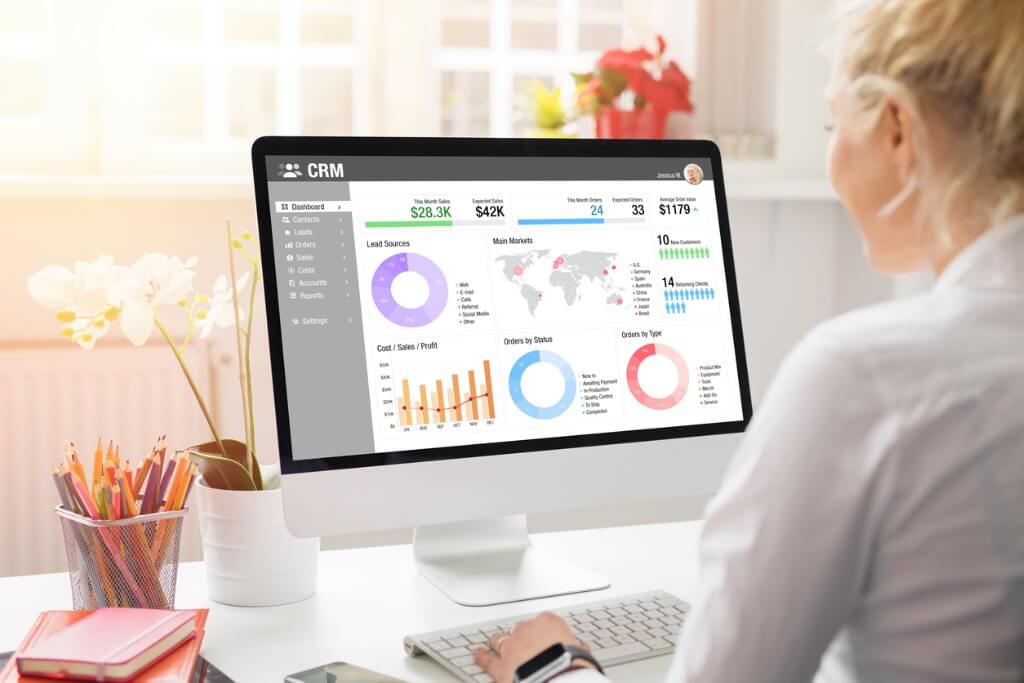
Customer relationship management software helps teams with marketing, sales, and customer service. Features like lead and contact management help you keep track of clients. Integrated Marketing features help you reach more potential customers in your target audience and retain them by providing a high-quality customer experience.
This software often includes team collaboration features designed to help improve internal workflows and projects. CRM software is essentially a virtual assistant that manages the most important aspects of your business by helping you stay productive. Many have automation features, so you don’t have to be bogged down by manual tasks.
CRM solutions sound pretty amazing, but they can make you wonder if they’re really that great. What are the general pros and cons of the software?
What are the Pros of CRM?
The advantages of a CRM are in abundance. The primary purpose of a CRM is to streamline your workflows and enhance business relationships with clients. With a CRM, teams can do more work faster and speed up company growth.
As a result, many companies see more business thanks to increased productivity and management with the software. The global CRM industry, valued at $73.40 billion in 2024, is forecast to expand rapidly, reaching $163.16 billion by 2030. This trajectory represents a strong CAGR of 14.6% during the 2025–2030 period.
CRMs also have follow-up, customer service, and contact management features to help you maintain customer retention. You will be able to manage clients better and have time to build relationships with a human element. Some CRMs have advanced chatbots that can interact with potential customers for the best customer experience.
Here is a list of some of the many advantages of a CRM tool:
- Strong return on investment (ROI) as a result of increasing productivity
- Improve customer satisfaction and overall retention
- Expedite team workflow through management features
- Keeping a better track of your growing customer base
- Stronger outreach through email marketing
- Ability to integrate with other software or social media accounts
- Ability to track your client responses on both social media and your site
- Help your customer service team manage tickets
- Helps with scheduling calls and meetings
- Offers you communication via multiple channels
- Optimizes team collaboration and communication
- Helps your marketing team with ad management and ad tracking
- Can offer in-depth reporting and analytics
- May have predictive analytics through artificial intelligence (AI) and machine learning (ML)
- Can help optimize your web platform through content management
- Can collect web analytics on your online presence
What are the Cons of a CRM System?
There isn’t an extensive list of problems with CRM software. It’s a software that offers a series of tools designed to help companies of all sizes and needs.
For every expensive CRM, there are affordable or even free versions available. The level of investment required will depend heavily on the specific needs of your use case. Most teams can benefit in some way from a tool to manage business needs.
A new startup with very few clients to start is a perfect example of a limited-scope use case. You wouldn’t have an overwhelming volume of tasks, emails, or services to provide because you’re still new. The unseen benefit is that the software can still help you stay organized and on track, even if you can live without it.
You don’t have to be in dire straits without a CRM to use a CRM. The software may also offer marketing automation, like email marketing functionality that could expedite your growth and outreach campaigns.
That doesn’t mean nothing can go wrong with a CRM; every CRM solution is different. Here is a quick list of some things that can go wrong with a CRM.
- The overall cost is too high for your budget
- Persistent bugs or errors with the application
- Not enough features to be worth the cost
- So much functionality that the learning curve is steep
- Technical support from the company is lackluster
- Problem with the user interface and dashboards
- Important features like email automation don’t work
CRM software itself rarely has cons, but you can certainly see issues if you choose the wrong CRM for your business. Some options might be too expensive, have too many features, or not enough features. You will need some patience when looking for the right one.
What Are Some Different Types Of CRM?
The list we have goes into some popular but also diverse options. If you are new to CRM systems, you will be able to learn quite a bit about what you really need by seeing which service caters to. Not all of these CRM options will be the best fit for you, and some may certainly be very costly, but others offer free tools. Check the prices for different CRM brands and features in the article here.
Click here to read about pricing for different CRM software.
HubSpot CRM
HubSpot is one of the most well-known and extensive CRM solutions. Medium and small businesses, as well as startups, predominantly use them. The most frequent use case for their cloud software is for computer software, marketing, and IT service companies. Their software is designed for managing business needs, marketing, and optimizing your customer experience.
HubSpot CRM is one of the top-rated CRM software and has strong positive feedback from user reviews.
Their positive user reviews highlight overall functionality and usability. The user interface (UI) for dashboards, forecasting, filtering, and general email management are points of satisfaction. One user was also very pleased with the software, keeping all their customer information and data in one place, making it easier for sales and marketing teams to track leads, follow up, and manage pipeline.
This same review also reported that the reports are useful, but not always flexible enough, and searching large amounts of data makes the system slow.
Here is another review based on a user experience mentioned in the TrustRadius platform.
“HubSpot CRM is used among all front-office (Sales) staff in our facility as a virtual “rolodex” of sorts: capturing conversations and contacts. This is an invaluable tool should a team member be away from work – by logging in to HubSpot CRM, whoever is taking over their duties can easily access their email contact list at a glance.”
Read Chris’ full review here.
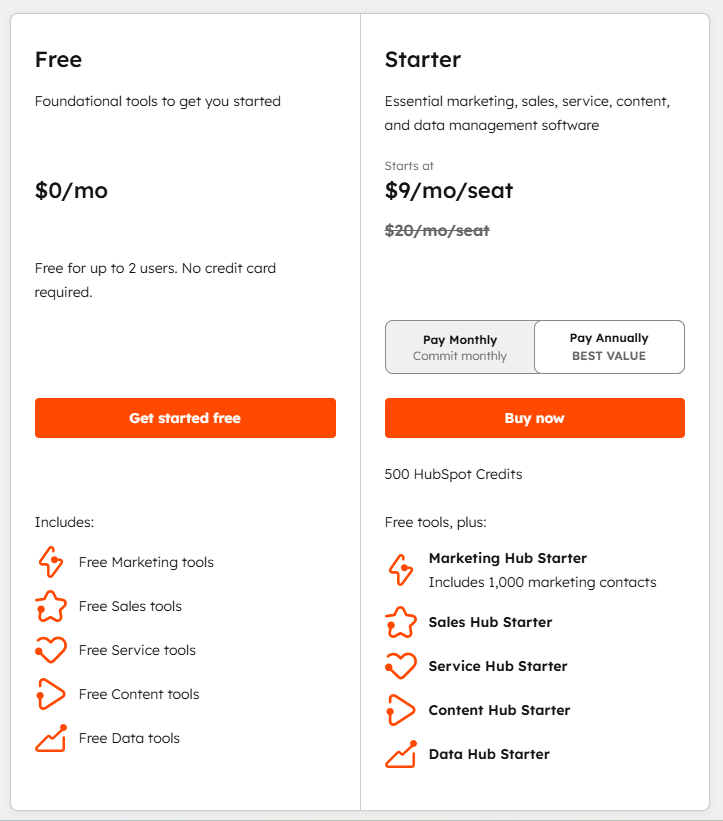
HubSpot Free CRM offers a unique amount of features and functionality for small businesses. You get a CRM system with capabilities from HubSpot’s main services, such as their Sales Hub, Marketing Hub, Customer Service Hub, and even the Operations Hub. If you are new to CRM solutions, then HubSpot’s free version is one of the best ways to get started.
| HubSpott Free CRM Plan | HubSpot Free CRM |
| Cost | $0 |
You have free access for up to 2 users. The common CRM features of the free version include free marketing tools, sales tools, service tools, content tools, and data tools.
Email management is one of the most offered tools by CRM providers. If a CRM didn’t have any capability to streamline your daily email workflow, it would be rare and not worth your time. Most types of CRM have some form of dashboard, but vary in what they provide for analytics. HubSpot comes with reporting dashboards, analytics for social media, blog posts, and CTAs.
As for unique CRM tools, they have quite a few features. These include chatbots, real-time messaging, customer data sync, and ticketing. They also have tools for website traffic analytics, web page building, and blogging.
The freemium subscription is still only the “lite” version of all these tools. For the paid plans, you get fewer limitations, such as the removal of HubSpot branding, and a 5x marketing contact tier email send limit per calendar month. For the entire list of all features and limitations, see their breakdown here.
Luckily, with HubSpot, your marketing or sales team can easily move up to any of the paid plans in their hubs while simultaneously keeping the free accounts for members who don’t need access to paid features. This can save you money in the long run, so you don’t have to purchase for all your salespeople, marketers, or customer experience agents.
Zoho CRM
Zoho Corporation is an office technology company that provides a diverse software cloud. Zoho CRM is one of their most popular applications for everyday business needs. It comes with access to the Zoho cloud and other powerful business tools. The software itself was developed with extensive features and functionality to speed up your workflow and manage your customer information.
Zoho CRM has a strong positive reviewer sentiment, which is no surprise considering they are one of our Top Rated software.
Here is a review based on a user experience mentioned in the TrustRadius platform.
“I’ve had an extremely incredible experience in general involvement utilizing Zoho CRM. By and by, I wouldn’t collaborate with anyone else right presently. Indeed, for individuals who are not familiar with CRM frameworks, its user-friendly plan makes it very simple to utilize. For some time now, we have been utilizing Zoho CRM, and it has been essential to the operation of our company. With information at my fingertips when required, it taken care of my information and made my whole organization sensible. But as I looked around, and need to know the stage way better. All in all, I venerate this CRM.”
Read the full review here.
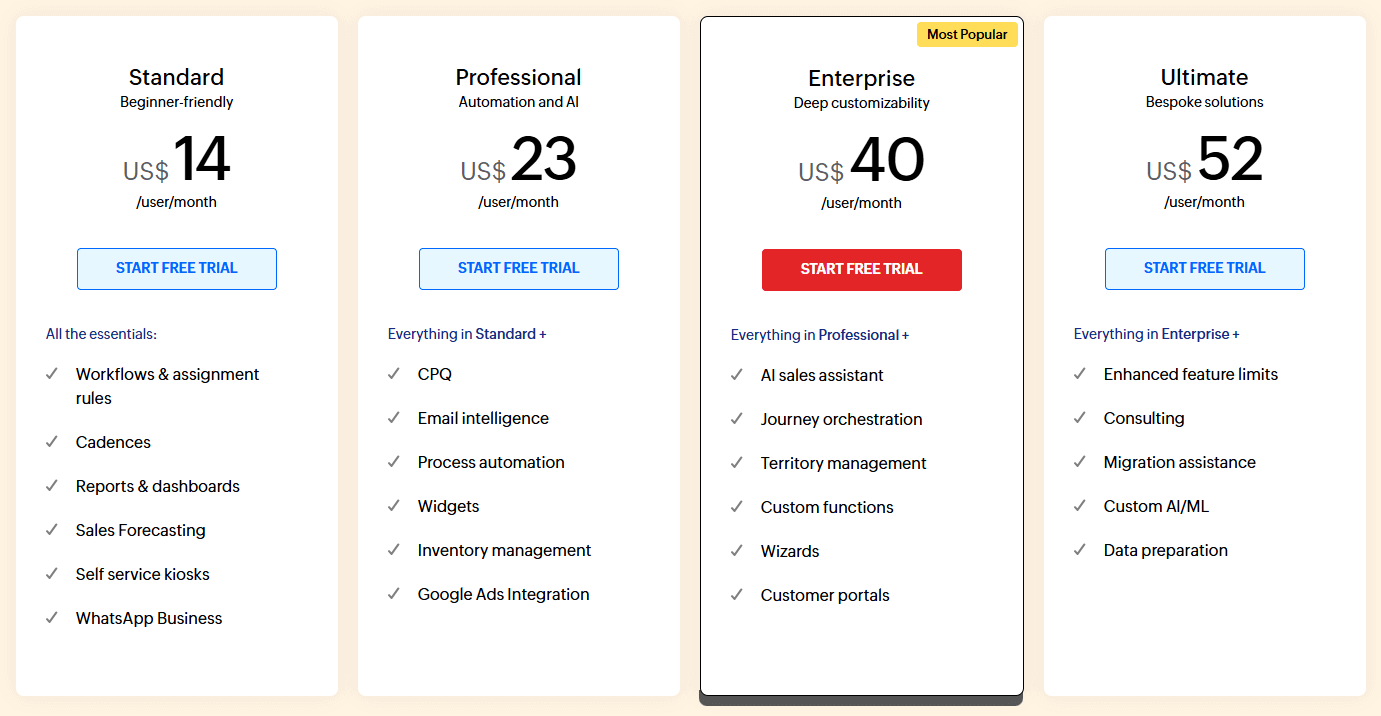
Zoho CRM subscriptions can be purchased both monthly and yearly, with yearly costing less. It’s charged per user, with a free trial option available.
If you are a small business or startup, you can certainly save while still being able to afford their plethora of features. Bigger teams will certainly spend more, so it is important to consider who really needs access. For Zoho CRM’s individual feature breakdown of all plans, go here. You will find every detail you want to know before buying there.
| Zoho CRM Plans | Free | Standard | Professional | Enterprise | Ultimate |
| Cost | Free for 3 users |
$14.18 per user per month, billed monthly; $8.73 per user per month, billed annually |
$22.91 per user per month, billed monthly; $15.27 per user per month, billed annually |
$32.73 per user per month, billed monthly; $26.18 per user per month, billed annually |
$34.91 per user per month, billed monthly; $28.36 per user per month, billed annually |
For Free, you are able to access a small number of common CRM features. This includes lead and contact management, sales forecasting, and standard reports. You also have access to the document library with 1GB of storage. The subscription even has data administration features, storing your customer information.
For a free version, it’s a great way to get started. It has email templates and email notifications, as well as status updates and direct messaging for your team. In general, it’s not worth it for teams that want more technical support, reporting, marketing automation, or analytics.
The plan is good for those very new to CRMs, but don’t want confusing features. It’s not for a team looking to speed up their growth.
The Standard subscription comes with much better functionality compared to the Free subscription. It gives teams multiple pipelines, custom fields and lists, and 100 custom reports, as well as scheduled reports. It does come with some analytics like charts, custom, and standard dashboards, along with analytics for the mobile app.
Teams will also appreciate full access to all social media management features and added marketing capabilities. You can reach more potential clients with mass emails, campaigns, and email templates. Teams will be able to integrate with Microsoft and Google workspaces, but are limited to other add-ons for operations. The plan allows teams classic support, which is the highest you can go before buying technical support separately.
This option does not offer much for customer support or inventory management and has limited access to web forms. This plan is still substantial for tracking customer interactions and optimizing daily workflows. It does not have all security admin features, but it comes with GDPR and HIPAA compliance, so you can avoid security issues with customer data.
Professional offers teams access to all data administration features like additional storage per user, 2 data backups a month, more import records, and de-duplication of records.
This plan is a fair in-between option that is affordable but can still optimize the sales process, marketing projects, and overall management of customer contacts. This plan is great if you want a simple CRM. Zoho has other more powerful features like developer tools and predictive analytics. If you wanted intensive and complex features, then it would be worth it to upgrade.
When it comes to Enterprise and Ultimate, they both have access to the full list of Zoho features and tools. This means all analytics features, all predictive analytics, and even all dev tools in their arsenal. The main difference between these two is how much of each resource is allotted.
If you need all possible functionality that Zoho can offer, then Ultimate is your best option. You can look through the small differences in numbers between them and consider for yourself how many resources you actually need.
Although Zoho can get expensive, it is one of the most affordable CRM solutions. Many cost hundreds or more per user per month, as you will find when looking at related software.
Creatio CRM
Creatio has both a CRM solution and a no-code solution. Creatio overall has very positive review feedback. In the graph, it’s calculated to have zero negative feedback, but that does not take into account high-rated reviews that still talk about issues or bugs experienced.
Here is one of the reviews based on a user experience mentioned in the TrustRadius platform.
“We are technology partners of Creatio, and we create customised solutions for our clients using the functionalities provided by Creatio and by creating the manual functionalities using the provided building blocks from Creatio. We cater to business problems from different sectors such as Finance, Banking, and F&B. The scope can be tailored according to the requirements.”
Read Siddharth’s full review here.
Each of Creatio’s services has different pricing models. For their CRM, you buy it in separate services to create a bundle, or you only buy the service you need. They have a plan for your marketing team, salespeople, and customer service representatives. It’s set up to be intuitive.
With AI being an integral part of every business, Creatio is now offering separate plans for its AI actions. With different plans available for using AI actions, Creatio is set to bring innovation to your desk as well. Check all its pricing here.
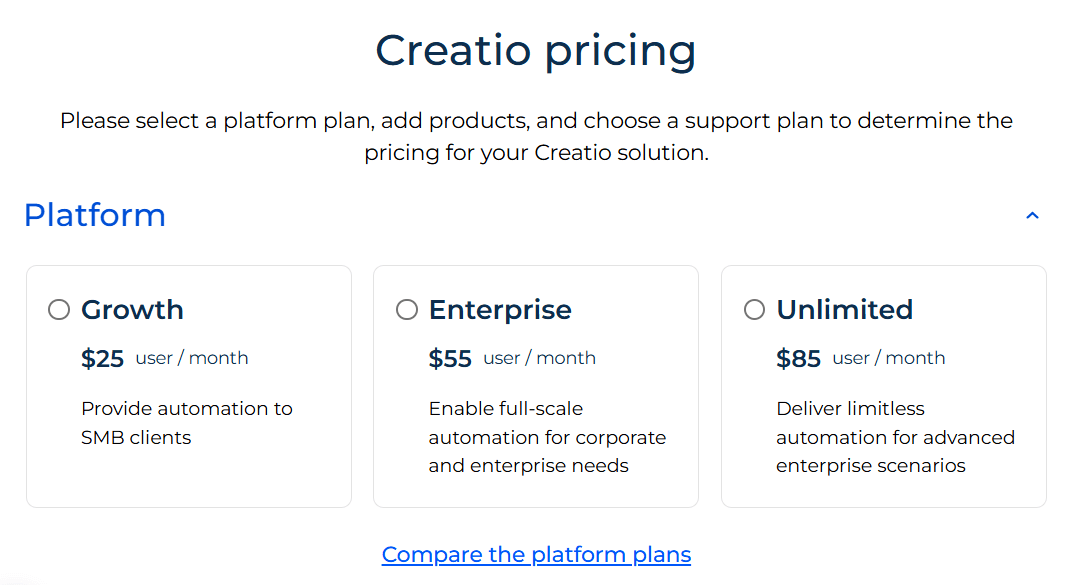
All subscription plan costs are determined by how many users you need. Each product offers its own cost calculator. The sales and service options also have their own sub plans as well, but for the calculator estimate, it was left on their cheapest plans. Check the different pricing for the Creatio Solution below.
| Creatio CRM Plans | Costs |
| Marketing Creatio | $15 for 50 users per month |
| Sales Creatio | $15 for 50 users per month |
| Service Creatio | $15 for 50 users per month |
| Creatio Studio AI-Native CRM Plans | Costs |
| Creatio Studio |
|
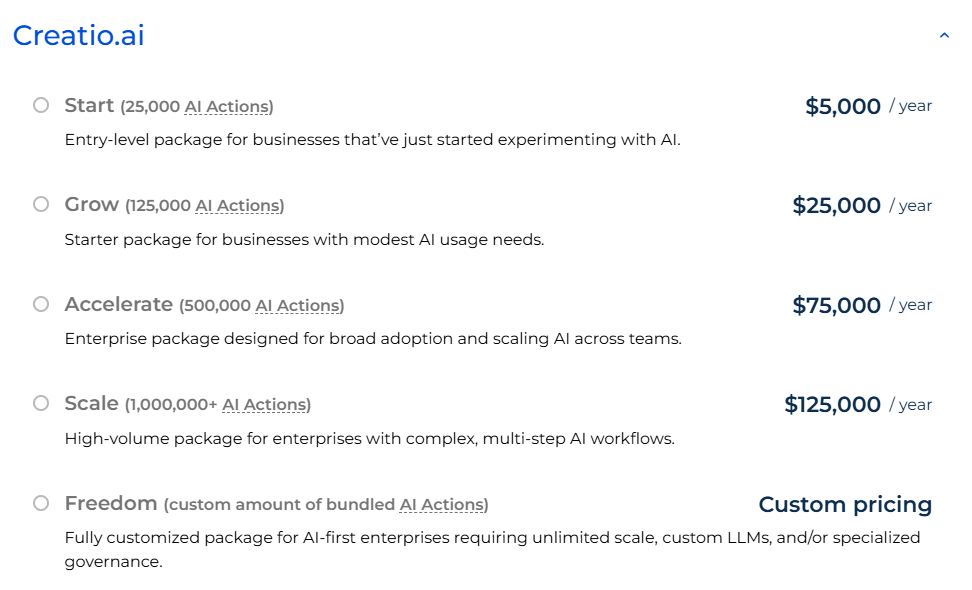
The Creatio CRM plans are astoundingly expensive, so what are their main benefits? The CRM subscriptions have access to Creatio’s no-code platform, which allows teams to build and customize their own CRM tools. You can develop tools for automation and productivity with ready-to-go templates.
If you choose to buy the full bundle, you can merge all CRM plans and manage the customer lifecycle from beginning to end. Creatio CRM plans together have extensive features for lead management, sales productivity, marketing campaigns, and case management.
Whether or not you choose one CRM service or all three, you will have the opportunity to customize it to fit your business needs and the goals of your team. Creatio CRM is best for those looking for personalized and robust software solutions for a high-end team.
Pipedrive
Pipedrive is a software company that offers a cloud CRM solution. The software is designed for managing customer relationships and contact information with sales as the main focus. Their reviews are strongly positive, but do have valuable criticisms as well.
Here is a review based on a user experience mentioned in the TrustRadius platform.
“Pipedrive enables sales organizations, especially startups, to easily track their sales deals and follow up on deals in the pipeline. It doesn’t have all of the bells and whistles, but it doesn’t need them. For the price, it’s a really great way to stand up a sales organization.”
Read Aviva’s full review here.
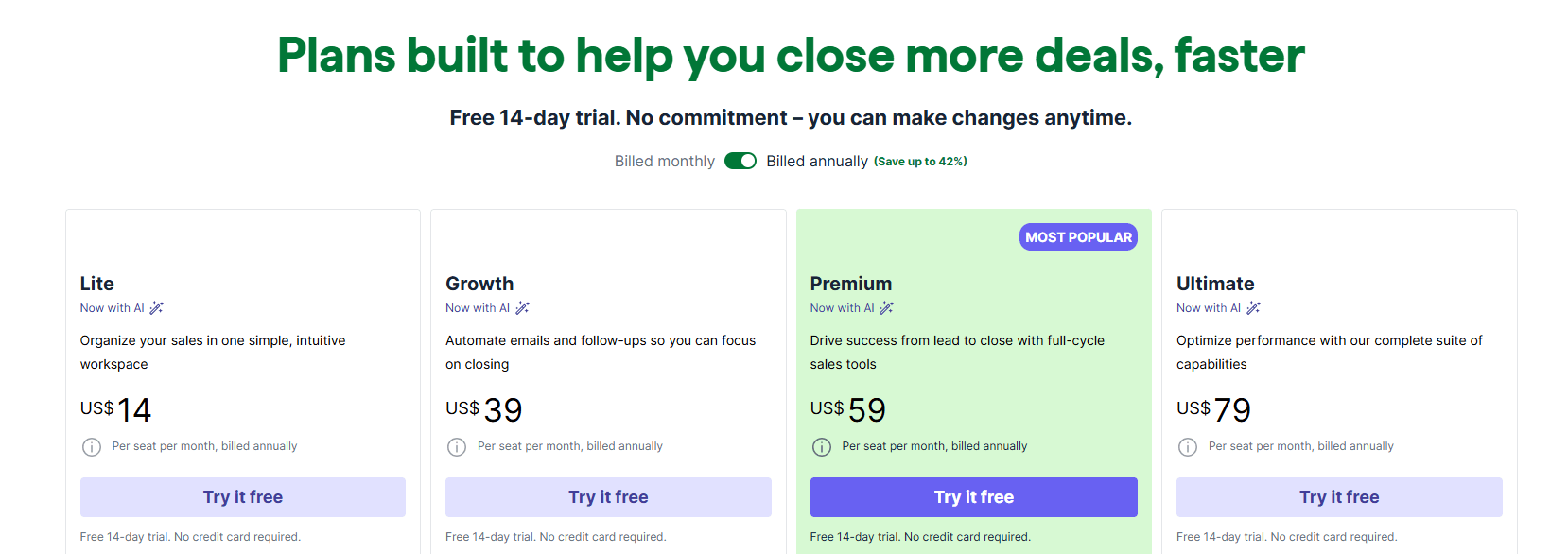
The pricing model for the software is flexible with both monthly and yearly options. It’s based on each user per month, with a discount for paying annually upfront.
| Pipedrive Plans | Lite | Growth | Premium | Ultimate |
| Costs |
$24 Per seat per month, billed monthly
$14 Per seat per month, billed annually |
$49 Per seat per month, billed monthly
$39 Per seat per month, billed annually |
$79 Per seat per month, billed monthly
$59 Per seat per month, billed annually |
$99 Per seat per month, billed monthly
$79 Per seat per month, billed annually |
For the Lite plan, you get the minimum functionality for a CRM. This means the good old favorites: lead management, contact management, sales reporting, and one dashboard.
The stronger features of their starter plan include custom fields, calendar, and pipeline management, AI-powered report creation, real-time sales feed, and 500+ integrations. The plan can use the mobile app for Android and iOS as well as sync across devices. For security and support, you get single sign-on (SSO) with encryption safeguards and chat support. This plan is great for those who are new to CRM and want to get the hang of using different tools and functionality before spending too much time and money. If you want more reporting, automation, and tracking ability, then you will need to upgrade.
The Growth subscription offers teams more features, but it’s not dramatically different than Lite. It has more deals per pipeline, more custom fields, but the same amount of security and support.
The plan offers full email sync with tracking, automations, nurturing sequences, subscriptions, and forecast reports, a meeting scheduler, and a contacts timeline with live chat support.
This plan has a little bit of all their important functions. You can get the job done, but not many special features.
Premium and Ultimate, there are a few small differences between them. Both have all the Pipedrive CRM capabilities, but Premium has slightly less security and support than Ultimate.
Premium is still a great plan and provides access to all CRM functionality, which includes all reporting features like lead generation and routing, custom scoring and company data enrichment, AI-powered multi-email tools, contracts, e-signatures, enhanced customization for teams, reports, and data fields.
Ultimate is the best choice for teams with multiple projects that need all the resources Pipedrive can offer. You can compare the two plans in Pipedrive’s direct item breakdown on their pricing page under “see all plan features.”
More Resources
If you want to see more CRM solutions and related software, you’re in the right place. We have a list of software for lead management, contact management, and, of course, CRM. We also have more resources, like an article featuring popular CRM features and an in-depth guide on how to choose the right CRM for your business.
For those who have used any of the platforms discussed here, please leave a review to help other buyers make informed decisions.