


How to Drive Reviews through Social Media
At TrustRadius, our favorite way to source trusted reviews is through email campaigns. We already have a bunch of content on the Review Generation Growth Hub to help your email campaigns be successful. Emails work because you can connect to your customer in an instant. Once that email hits their inbox all they have to do is open it and click the link to start their review. Emails are also cost effective because you can just send them with customer lists you already own. However, when it comes to review sourcing, there are various other methods that you can test and see what works best for you.
Facebook is probably one of the hardest social media platforms to try to gain reviews from. Most people just are not ‘following’ pages they are subscribed to on Facebook. But, if your company is lucky and does have a ton of followers on Facebook, go ahead and give it a shot! For Facebook, stick to the branding and similar posts that you usually utilize.
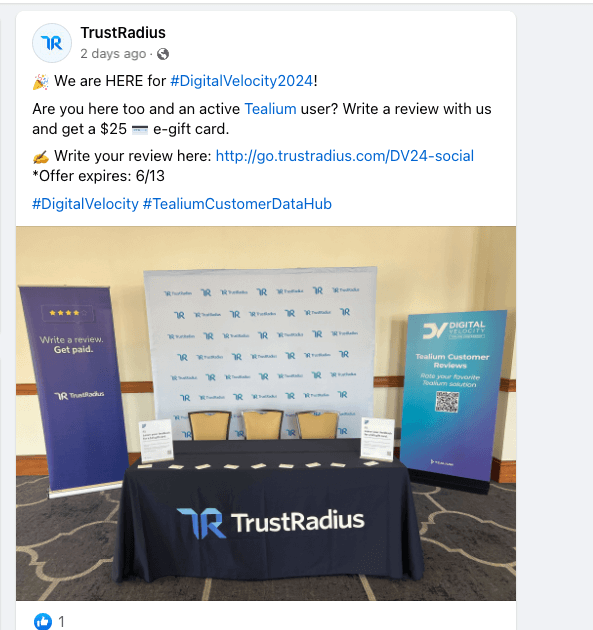
Below is a TrustRadius example that I think is really simple and would be easy to recreate. Use one photo on the post to catch some attention. Keep the text short, use hashtags and emojis if you would like. Use a shortened hyperlink that goes directly to the review platform. I also love that they included the expiration date. This makes sure that as the post ages out, people can see that the offer has already expired. It also creates a sense of urgency for the customer to write the review.
With Instagram, you have a few different ways that you can create posts and use them to generate reviews.
Instagram stories are available for up to 24 hours and you can include a direct link to the review platform. If you want to keep it up for longer than 24 hours, create an Instagram story highlight. Title it “Reviews” and then the first story post could include a link to the review platform and then the follow up stories can be quotes from past reviewers. When it comes to using stories, you want to use a graphic that stands out so when people are scrolling through the stories it will get their attention and make them pause. You also want to use as little text as possible. Here are two examples of an Instagram story ask:


Both of these were created easily using Canva templates. The graphic is clean, the text is short and the button link is clickable.
Instagram posts can either attach a single image, or create a multipost using the carousel option. If your main goal for the post is to only get reviews, using a single photo would be best. However, if you like creating carousels you can try to add in an image as the last one that just says something about writing a review. Instagram captions can be a bit longer and also utilize hashtags to drive SEO. One idea for posts is using a previous reviewer’s quote as the graphic and then in the caption saying that you love hearing from your customers and then follow up with asking for their feedback.
If you want to get even more creative, try using an Instagram Reel. With Instagram’s newer algorithm, Reels tend to be pushed out more to a broader audience. There is a downside to this option- while you may get more views it could also increase your chances of getting fake reviews. So for this option, it would be best to not offer any incentive to help mitigate fake reviews from coming in. Instagram Reels are about using some kind of currently trending music in the background and usually work best with real people in the video. Reels that play on humor or other current trends usually get increased views as well.
Since you cannot create a direct link in your captions for Instagram posts or reels, a way to get around this would be to add a link to your bio. You could utilize a multi link builder like Linktree so you can still have a link to your regular website as well, but then also a link to the review platform. This does create an extra step for the reviewer, but it may be worth the try.
X (Twitter)
Since X allows links and photos to be used in tweets, it is a great place to post and try to get reviews. X also has a character limit of 280, so it is obviously important to keep your tweets short. X is the more relaxed form of social media and where people tend to use more humor, so run with that. For X, links are usually shortened and in bit.ly format as well so keep that in mind when adding the review link. If you include an incentive, also add an offer expiration date.
Below are a few ideas for Tweets:
- We’re Top Rated on @TrustRadius. Help us stay on top by writing a review! ❤️
- Leave us a review, give this a retweet and earn a $25 gift card. 🤌
- You have things to say, we have $25 to give. Let’s make a swap, write a review on @TrustRadius now and the money is yours!
- The reviews are in and they are HOT HOT HOT! 🔥 Leave us your review on @TrustRadius and get a $25 gift card.
- Our customers are loving this new product feature! Click on the link and tell us how you have been using it. {Insert photo with a customer review quote}
Overall, social media can be a fun tool to drive reviews. However, since social media posts can be so visible and searchable, it can lead to fake reviews if not executed properly. Some of our biggest fake reviews come from people searching on social for reviews for money, regardless of product. Here are a few things to note before moving forward with a social media campaign:
- Reach out to your CSM to let them know you are running a social media campaign
- Make sure the disclaimers and expiration dates are visible
- Delete (or archive) the posts once you are done review sourcing.
About the Author(s)